
A template defines what the Live Coach guides you on during a call: the checklist you tick off (the techniques to cover) and the advice triggered at the right moment. You pick your template when you start the call.
Where to find them
In the app, open the Templates menu.
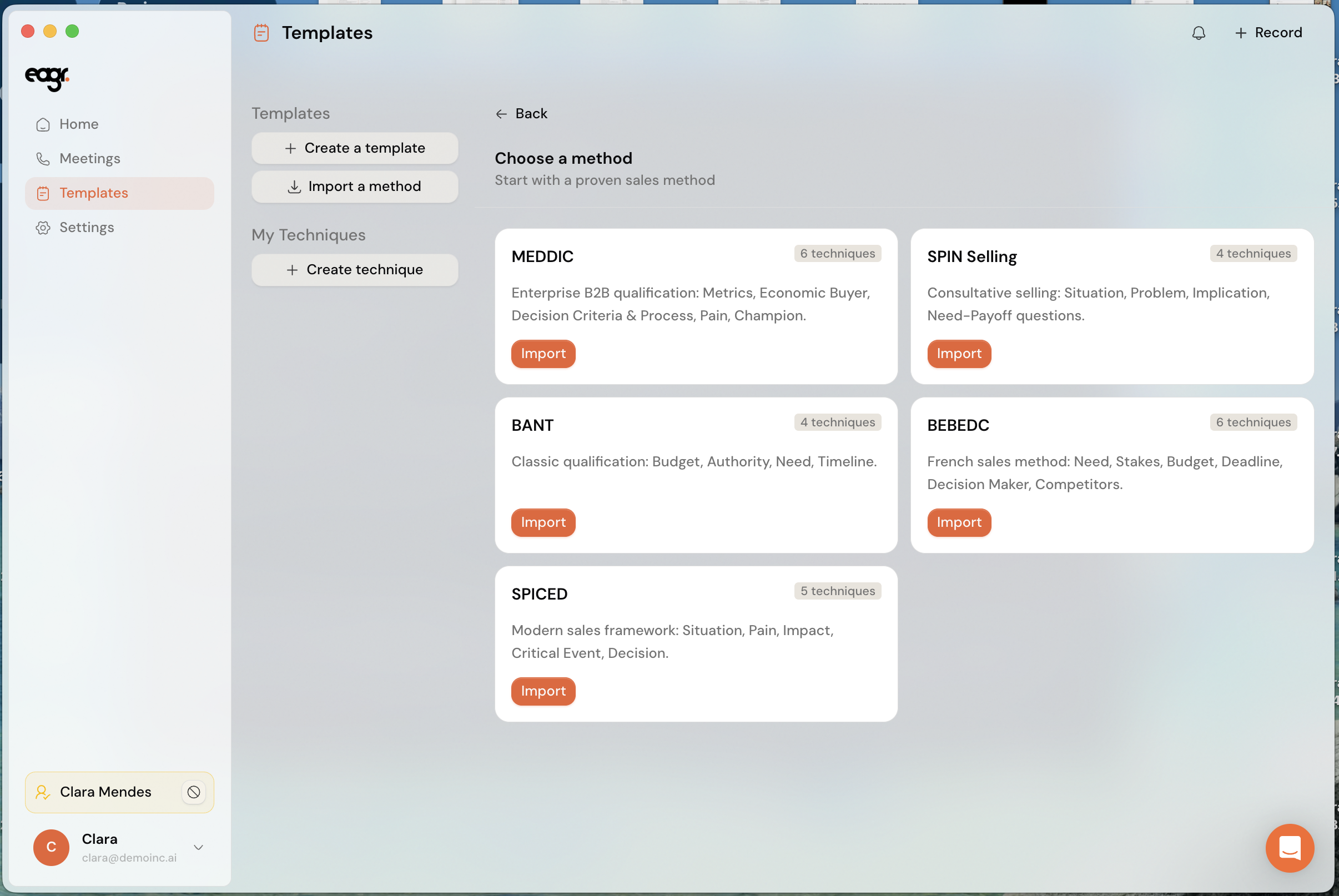
Three types of templates coexist.
1. Ready-made methods
Proven sales methods, available to everyone. Click Import a method to add one:
- MEDDIC: complex B2B sales qualification
- SPIN Selling: consultative selling
- BANT: classic qualification (budget, authority, need, timeline)
- BEBEDC: French method (need, stake, budget, timeline, decision-maker, competitors)
- SPICED: modern selling (situation, pain, impact, compelling event, decision)
2. Your organization's templates
Your company can provide templates built from your playbook: they reuse your segments, competencies and techniques, so live coaching matches your sales method exactly.
3. Your own templates
You can also create your own: Create a template to start from scratch, or Create a technique (the My techniques section) to add your own checklist items.
Pick a template that fits the call type: a qualification method (MEDDIC, BANT) for a discovery call, a more consultative approach (SPIN, SPICED) depending on your cycle.
Using a template
When you start a call via + Record, you pick the template in the Call configuration window. See Launch the Live Coach during a call.